Can My Laptop Go in Carry-On?
June 24, 2025There’s something uniquely stressful about airport security. It doesn’t matter how many times you’ve flown. One minute you’re confidently striding in with your roller bag, the next, you’re barefoot, sweating, and feeling oddly guilty—as if you smuggled in a full lasagna when all you’ve got is a half-eaten granola bar and a travel-sized toothpaste. The moment you reach the conveyor belt, your inner monologue starts spiraling: “Wait, can my laptop go in carry-on?”“Can laptop chargers go in carry-on too?”“Should I have checked it?”You Google it, your browser history becomes a mess of TSA rules and Reddit panic threads, and you’re somehow more confused than when you started (Honestly, I’m sweating just writing this—airport PTSD is real!)
Let’s cut through the airport anxiety fog. Here’s a simple, snappy guide to what you can and should do with your laptop when flying.
Carry-On: Your Laptop’s Best Friend
Let’s answer the big one right away: yes, your laptop can go in your carry-on. And more than that—it absolutely should.
Airlines and security agencies like the TSA and FAA actually recommend that you keep laptops in your hand luggage. Why? Lithium-ion batteries. These tiny powerhouses don’t play nice when left unsupervised in the cargo hold. If something goes wrong (think overheating or a battery failure), it’s a lot easier to deal with mid-cabin than mid-belly-of-the-plane. The same logic applies to other battery-powered items—like power banks. (Curious about those? Check out my guide on whether power banks can be taken on a plane.)
Plus, carry-ons mean control. Your laptop stays close. No mystery bruises, no wondering if it’s doing somersaults under someone’s ski boots. Just you and your laptop—together through takeoff turbulence and mid-flight movie marathons.

Can I Put My Laptop in Checked Luggage?
Technically, yes. The TSA allows laptops in checked luggage, and many international carriers do as well. But unless you have absolutely no other choice, it’s not recommended.
Here’s what to consider if you’re thinking about it:
- Risk of damage: Even wrapped in clothes, your laptop is vulnerable to rough handling during transfers and loading.
- Theft: Electronics are among the most common items reported missing from checked luggage.
- Loss: Luggage delays and misrouting happen. Losing your laptop—especially if it contains work or sensitive data—is more than just inconvenient.
If you do check it, make sure it’s well-padded, powered off, and insured.
What About My Laptop Charger?
Yes, your laptop charger can go in your carry-on. In fact, it should. There are no restrictions on bringing your charger with you in the cabin. Having it accessible means you can charge up at the airport or during the flight if power outlets are available.
Tip: Pack it in a separate pouch or pocket. Chargers are bulky and can press against your laptop if stored together, which isn’t ideal. Separating them also makes things smoother at security.

Security Screening: What to Expect
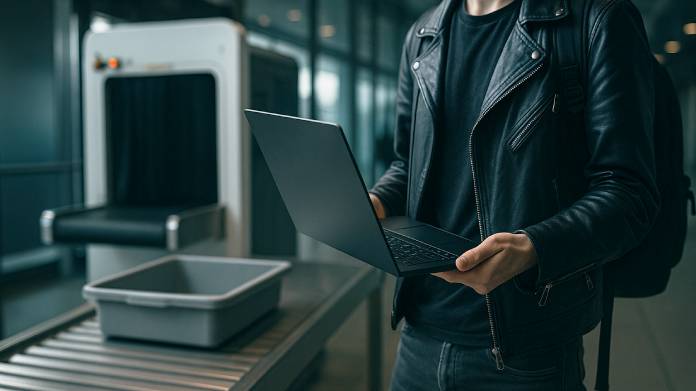
When you reach the TSA checkpoint, you’ll need to remove your laptop from its bag and place it in its own tray for X-ray screening. This is standard procedure (unless you have TSA PreCheck, in which case, congrats on skipping the chaos).
This allows airport staff to get a clear look at the device. If you’re using a TSA-approved laptop bag (which unzips and lies flat), you may not need to remove it at all. You don’t need to take out your charger, mouse, or other accessories—just the laptop itself.
Can I Use My Laptop on the Plane?
Yes—after takeoff and once the crew gives the go-ahead. During takeoff and landing, you’ll need to stow it away. Once cruising altitude is reached, you can use it (as long as it’s in airplane mode). Just remember to download files or entertainment in advance, in case Wi-Fi isn’t available or reliable.

Should I Travel with a Laptop at All?
If you’re traveling for work or need to stay connected, a laptop is often essential. But if you’re on holiday and just checking email or streaming shows, a tablet or phone might do the job. Fewer electronics means less to carry—and worry about.
If you do bring your laptop, make sure:
- It’s stored in a padded compartment
- It’s easy to remove at security
- It’s backed up in case something goes wrong
- It’s insured
Don’t have time to read this full blog – Key Takeaways…
- Can laptop go in carry-on? Yes—and it’s the safest, smartest place to keep it.
- Can laptop go in checked luggage? Technically yes, but it’s high risk.
- Can laptop charger go in carry-on? Absolutely, and it should be kept handy.
- Laptop in checked luggage? Only if you have no choice, and even then—pack with care.
Final Thoughts
Navigating airport security with a laptop can feel like a scene from Mission: Impossible—minus the cool gadgets and with more nervous sweating. But now that you know the rules, there’s no need for the Mission Impossible music in your head every time you approach the conveyor belt. Keep your laptop in your carry-on, pack your charger sensibly, and save yourself the worry (and potential heartbreak) of checking it. Security lines may always feel mildly accusatory, but at least you’ll breeze through knowing your tech is safe, your bag is sorted, and your Google search history can finally rest!